Network: Caddy reverse proxy

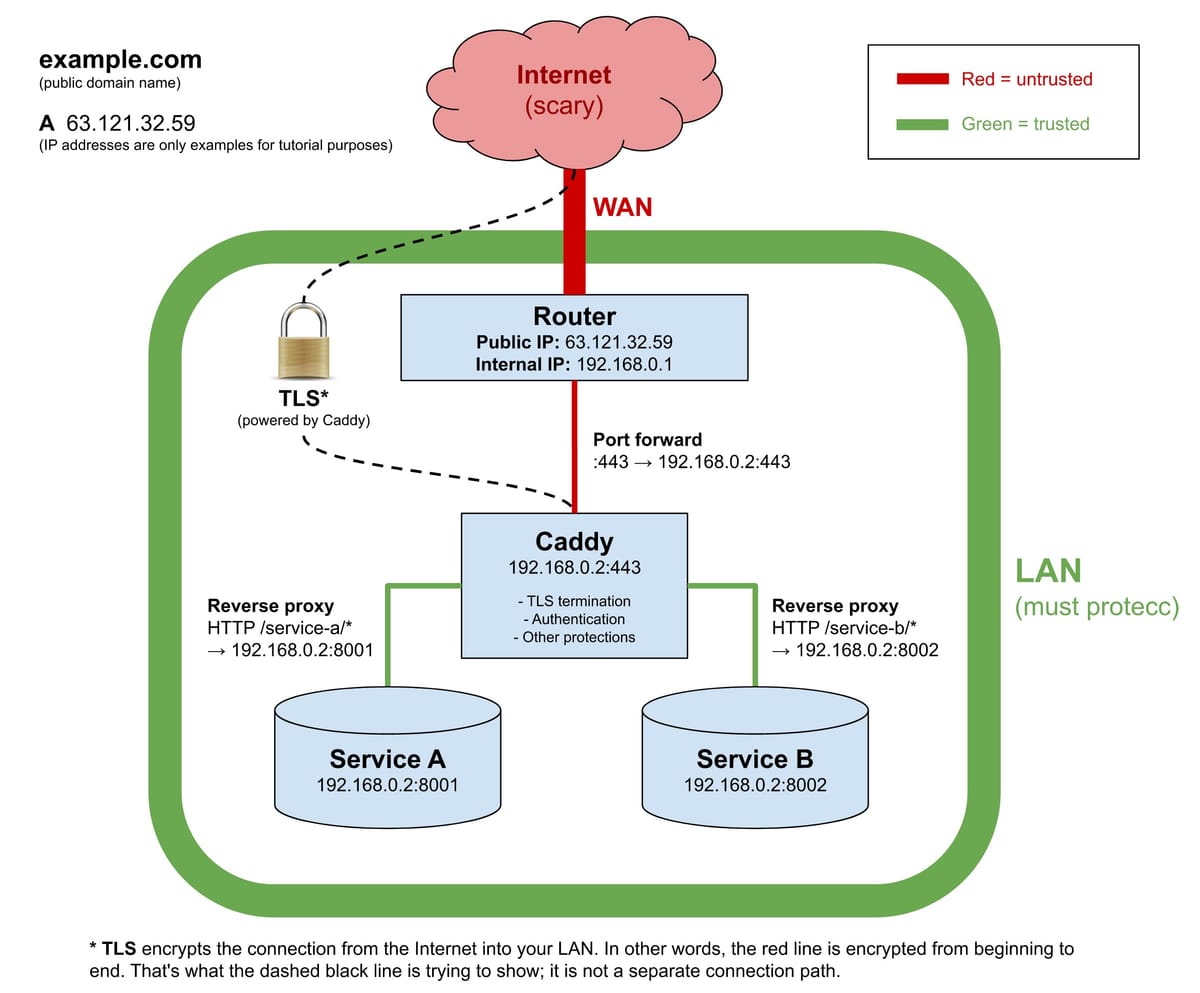
We run several websites on our MacMini, each with it's own URL, like http://blog.sv-jedi.org/ and http://files.sv-jedi.org/. With only our router having a public IP number, this means that in DNS these names all point to the same IP number, which is on the router, not the MacMini, which is on a private IP.
We need two mechanisms to make this work; the first one is a couple of port forwards in the router firewall. Whenever the router receives packets to it's public IP number for ports 80 and 443, it does it's Network Address Translation to the MacMini and forwards the modified packets there, plus of course the return packets are translated back to the public IP.
The MacMini needs a server to listen on ports 80 and 443. This is where Caddy comes in. We run the Ghost software as a server for the blog, FileBrowser for the cloud storage and PhotoPrism for our photo archive. We run these servers on non-standard ports, like 8001, 8002 etc.
When caddy receives a request on port 80 and the request is for http://blog.sv-jedi.org/ then it directs it to port 8001; if it's a request for http://files.sv-jedi.org/ it gets directed to port 8002 etc.
Caddy also add the TLS layer for encrypted TLS packets on port 443. It automatically gets certificates signed and installed and takes care of the encoding/decoding.
Caddy is open source software, available for free download.