Network: Dynamic DNS

The ISP we currently use for our VPN hub is Spectrum Cable. We get 700Mbps usable download bandwidth and their cable modem has a 1Gbps Ethernet port that provides us with a public IP number with DHCP. This is connected to our WAN port on the Mikrotik router.
A public IP number means that you can reach that IP number from anywhere on the Internet. Sometimes your provider gives you a private IP number instead, often from a so called CGNAT (Carrier Grade Network Address Translation) range of addresses. If you are that unlucky, you can’t use it as a VPN hub, in which case I recommend to rent a Linux VPS for as little as $6/month and make that your hub because it will get a public IP address.
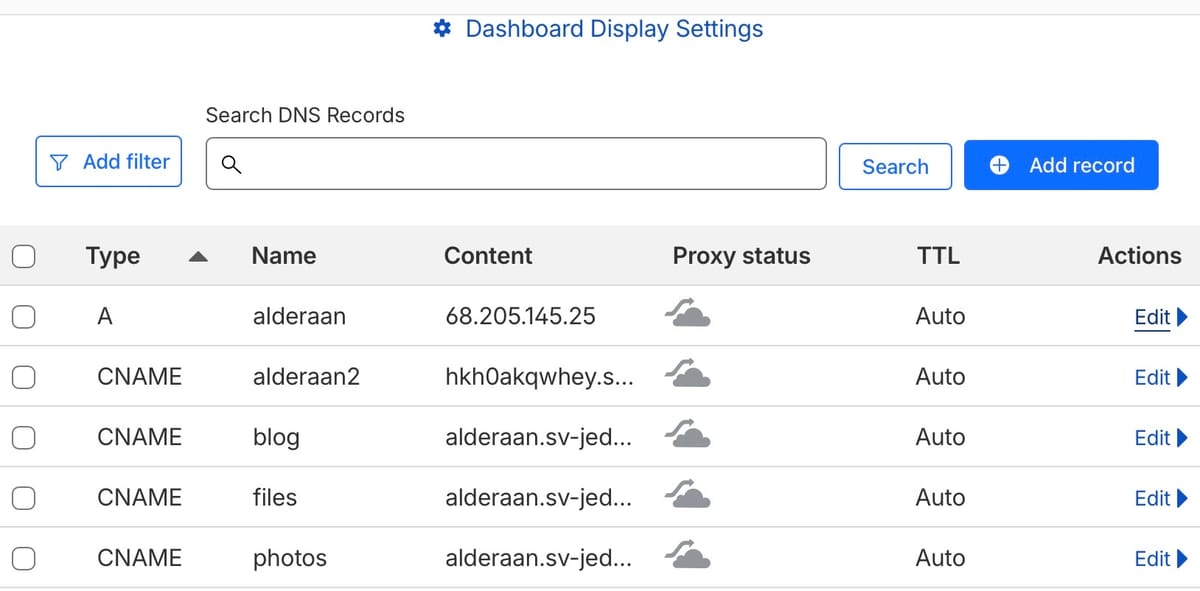
With a public IP number we’re not there yet. We can put this IP in our name server so that, for example, our router called alderaan.sv-jedi.org points to that IP number… but what if our provider decides to change your IP number? There’s no guarantee they won’t do that, so we need to change our address in the name server when this happens. This is called dynamic dns and some name servers have an API that allows just that. Unfortunately, our name servers were with Network Solutions and they don’t support that, so we opened a free account with CloudFlare and moved our DNS onto their servers. You can see some of our DNS entries in the screenshot above.
On the Mikrotik router we need to run a script that periodically checks our IP address and compares it with DNS. When it’s different it must update DNS to the new IP address. ChatGPT quickly wrote this script for my Mikrotik router and we scheduled it to run every 5 minutes. Testing was fun: we changed the IP address manually on the name server to a fantasy address and within 5 minutes the script changed it back to the correct address 👍
This script isn’t easy… it requires security with encryption keys etc. to be allowed to update the name server but luckily ChatGPT is well aware of the CloudFlare API as well as the Mikrotik router.
There’s a second option which is Mikrotik specific and it’s called the “IP cloud” command, where Mikrotik does this same thing in their own name servers under the mynetname.net domain, providing you with a name that points to the correct IP address. I created an alderaan2.sv-jedi.org DNS entry which is a CNAME (synonym) to that mynetname.net host name they created for me.
The reason that I don’t use that primarily is that when you use this, you get redirected to this mynetname domain instead of our own domain.
In the screen above you can see that a name like blog.sv-jedi.org is actually a CNAME entry pointing to alderaan, which is the router, not the Macmini server. This means that the router must forward some traffic to the MacMini instead of itself. This port forwarding with multiple names pointing to the same server will be discussed in a later post.